 PecaShelf
The lines that stopped you, kept safe.Những câu từng khiến bạn dừng lại, được giữ gìn.
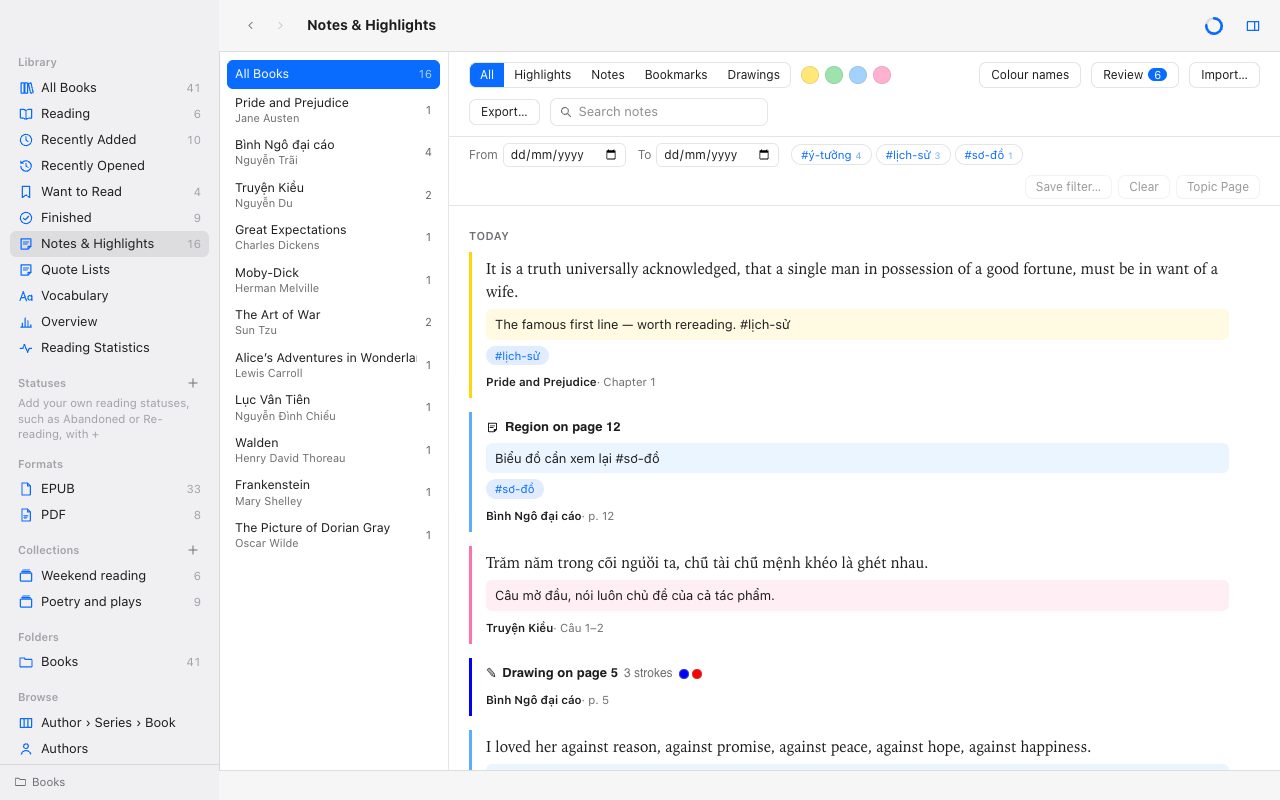
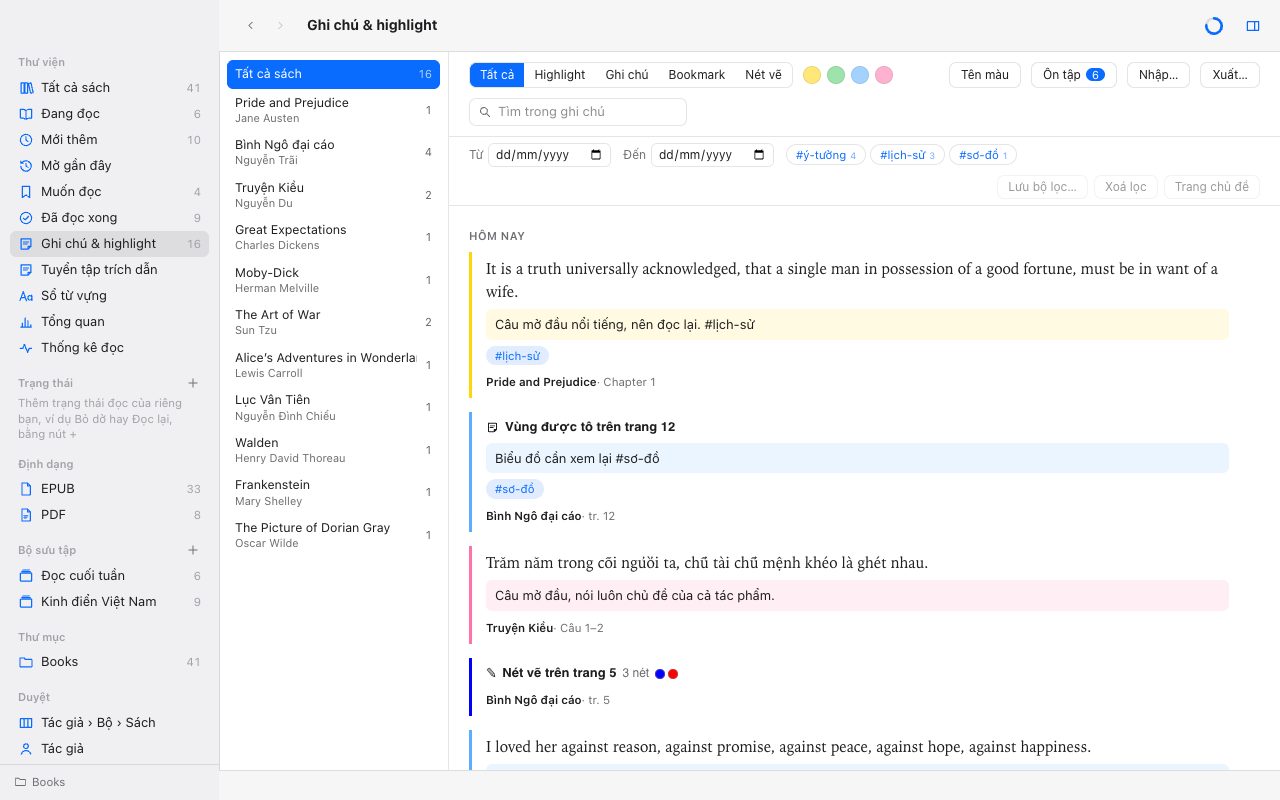
Every highlight and note from every book, in one place, one click from the page it came from. Pro adds tags, links between notes, daily review and exports to Markdown, Obsidian and Logseq.Mọi highlight và ghi chú của mọi cuốn ở một chỗ, bấm một lần là về đúng trang. Pro thêm thẻ, liên kết giữa ghi chú, ôn tập hằng ngày và xuất ra Markdown, Obsidian, Logseq.
FreeMiễn phí
- Highlights, notes and bookmarks in both readers, collected in Notes & Highlights with filtersHighlight, ghi chú và bookmark ở cả hai trình đọc, gom về Ghi chú & highlight kèm bộ lọc
- Named highlight colours, #tags in notes, a notebook and a Markdown review for each bookĐặt tên màu highlight, #thẻ trong ghi chú, sổ tay và nhận xét Markdown cho từng cuốn
With ProVới Pro
- Export highlightsXuất highlight — Save your highlights and notes as Markdown, CSV, JSON or HTML, or as one Obsidian note per book with frontmatter.Lưu highlight và ghi chú ra Markdown, CSV, JSON hoặc HTML, hoặc mỗi sách một ghi chú Obsidian có frontmatter.
- Automatic Markdown exportTự xuất Markdown — Choose a folder once, for example in your Obsidian vault: PecaShelf keeps one Markdown note per book there and rewrites it a few seconds after you add or change a highlight or note.Chọn một thư mục một lần, ví dụ trong kho Obsidian: PecaShelf giữ ở đó mỗi sách một ghi chú Markdown và viết lại vài giây sau khi bạn thêm hay sửa highlight, ghi chú.
- Import Kindle highlightsNhập highlight từ Kindle — Bring in the highlights and notes from a Kindle My Clippings.txt file. Books are matched by title and author, and you tick what to import after a preview.Nhập highlight và ghi chú từ tệp My Clippings.txt của Kindle. Sách được ghép theo tên và tác giả, và bạn chọn những gì cần nhập sau khi xem trước.
- Import from Apple BooksNhập từ Apple Books — Bring your Apple Books highlights and notes into PecaShelf, and copy books without DRM into your library. Each book is previewed first and nothing is copied twice. Apple Books' own files are only read.Đưa highlight và ghi chú Apple Books vào PecaShelf, và chép sách không DRM vào thư viện. Mỗi cuốn được xem trước, không cuốn nào bị chép hai lần. Tệp của Apple Books chỉ được đọc.
- Export for ReadwiseXuất cho Readwise — Save your highlights and notes as a CSV file in Readwise's import format, then upload it on readwise.io yourself. PecaShelf never connects to Readwise.Lưu highlight và ghi chú thành tệp CSV đúng mẫu nhập của Readwise, rồi tự tải lên readwise.io. PecaShelf không bao giờ kết nối tới Readwise.
- Export to AnkiXuất sang Anki — Turn highlights, question notes, fill-in cards and saved words into an Anki import file, one deck per book.Biến highlight, ghi chú hỏi đáp, thẻ điền khuyết và từ đã lưu thành tệp nhập cho Anki, mỗi sách một bộ thẻ.
- Quote cardsThẻ trích dẫn — Turn a highlight into a picture with the book's title: five styles, your choice of background and shape, saved as a PNG or copied.Biến một highlight thành hình ảnh kèm tên sách: năm kiểu, tự chọn nền và khung hình, lưu thành PNG hoặc sao chép vào bộ nhớ tạm.
- Links between notesLiên kết giữa các ghi chú — Type [[Book title]] or [[Book title#some words]] in a note to link to a book or a highlight, and see which notes link back to them.Gõ [[Tên sách]] hoặc [[Tên sách#vài từ]] trong ghi chú để liên kết tới một cuốn sách hoặc một highlight, và xem những ghi chú nào liên kết ngược lại.
- Daily reviewÔn tập hằng ngày — Remember what you read: a few highlights a day come back for you to recall, and the ones you forget return sooner. It all stays in the app, with no notifications.Nhớ những gì bạn đã đọc: mỗi ngày vài highlight quay lại để bạn nhớ lại, cái nào quên sẽ quay lại sớm hơn. Mọi thứ chỉ nằm trong ứng dụng, không có thông báo.
- Fill-in and question cardsThẻ điền khuyết và thẻ hỏi đáp — The daily review can hide the key words of a highlight for you to recall, and a note written as “Q: … A: …” becomes a question card.Ôn tập hằng ngày có thể che từ khoá của highlight để bạn nhớ lại, và ghi chú viết dạng “Q: … A: …” thành thẻ hỏi đáp.
- Vocabulary notebookSổ từ vựng — Save a word while reading an EPUB, with the sentence it was in and the book. Write its meaning, look it up, open the book at the word and review your words as cards, a few a day.Lưu từ khi đọc EPUB, kèm câu gốc và cuốn sách. Ghi nghĩa, tra từ điển, mở sách đúng chỗ có từ và ôn từ bằng thẻ, mỗi ngày vài từ.